



Academic Half Day workflow: 2024

Home » Curriculum » Academic Half Day workflow: 2024
Headshot of Ariane Smith, Digital Publications Manager
Ariane Smith
Digital Publications Manager
envelope icon
Headshot of Heather Jansen, Web and Digital Publishing Coordinator
Heather Jansen
Web and Digital Publishing Coordinator
envelope icon
Table of Contents

CBL
roles

AHD resources

The CBL director and Digital Publishing update the status of each case in the Case Drafts Library in SharePoint.

    1. To update the Case Status in SharePoint, click on Edit in grid view.
    2. When you are done with your updates, click it again to save your changes.


Note:

  • When the case status changes to Ready for Production, it automatically notifies Digital Publishing that the case is ready for production.
  • When Digital Publishing changes the case status in SharePoint to In production, it automatically notifies the CBL director and the facilitator distributor. When the case is In Production, no further changes can be made to the Word document (if there is one), and further changes should be communicated in Slack.

Case development

Faculty create the case in Word or PowerPoint. Before the case goes into production, the case is reviewed by the Clerkship director.

Clerkship director review cases

Case goes into production

3 months in advance of case being taught.

Case production

The Digital Publishing team produces the final case (epub files) using Adobe InDesign and places the facilitator version on the MD Learning site. 

Proof 1

The Digital Publishing team incorporates edits into previous year's layouts.

If a case has been rewritten or is new, the case will be taken out of Word and designed into pages in the layout program (Adobe InDesign). Patient portraits are added, and interactivity is integrated via pop-up buttons for student and facilitator notes, as well as links to external sources. Depending on the source material, we create image galleries and interactive labeled images.

The first proof is sent to the faculty who created the case and Clerkship director via email.
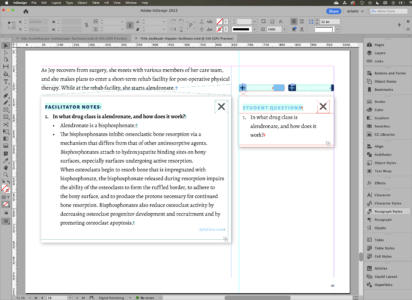
Clerkship director and/or Faculty reviews proof 1

Corrections sent by editor to Digital Publishing via email. These can be more substantial edits, like rearranging where questions come up in a case, but also include minor rewording, clarifying details, and correcting inconsistencies in the case.

Proof 2 (if further edits are made) or final proof

Digital Publishing makes edits and sends second proof to case editor for review.

Clerkship director final review (if needed)

Final files

1 week in advance of case being taught.

Digital Publishing creates final facilitator version and student versions (without answers).

Digital Publishing puts the Facilitator version on the MD Learning site and uploads files to Sharepoint.

Digital Publishing emails AHD distribution team with details and link to files.

Epub distribution

Send out epubs to facilitators as soon as possible; student versions go out via Jamf and on E.Flo MD on session schedule.

Prep for the next year

After the cases are taught, the facilitator note-keeper compiles comments and edits for next year.

The Word templates for these alterations are on Sharepoint.

Digital Publishing makes the edits and saves a final facilitator version, ready to go out next year to system directors.

Digital Publishing reviews the edit documents and then moves them into the patient folders. The completed edits will be indicated by strikethrough.